

After a first hands-on at Gamescom, we were finally able to install the Thrustmaster SimTask Truck-40 under normal conditions and take to the road on Euro Truck Simulator 2.
Updated October 23, 2026: We have updated the software section of this review based on Thrustmaster's announcements. The driving impressions and installation difficulties remain those of our initial test; they do not constitute a new test with the latest versions.
The principle is appealing: a real 40cm truck steering wheel , controls adapted to ETS2 and American Truck Simulator, but above all an imposing metal support designed to reposition the base much more horizontally than with a classic simracing setup.
At the time of our test, the kit was priced at €249,99 . The partner code UNIVERSSIMU was advertised with a 5% discount on the Thrustmaster store ; check the terms and conditions in effect at the time of ordering.
👉 See the Thrustmaster SimTask Truck-40 on the official store — partner code UNIVERSSIMU
We tested it on PC with a Thrustmaster T598 Direct Drive and Euro Truck Simulator 2. While the hardware impressed us in many respects, our initial setup wasn't entirely "plug and play." The software updates detailed below should therefore be considered separately from this initial experience.
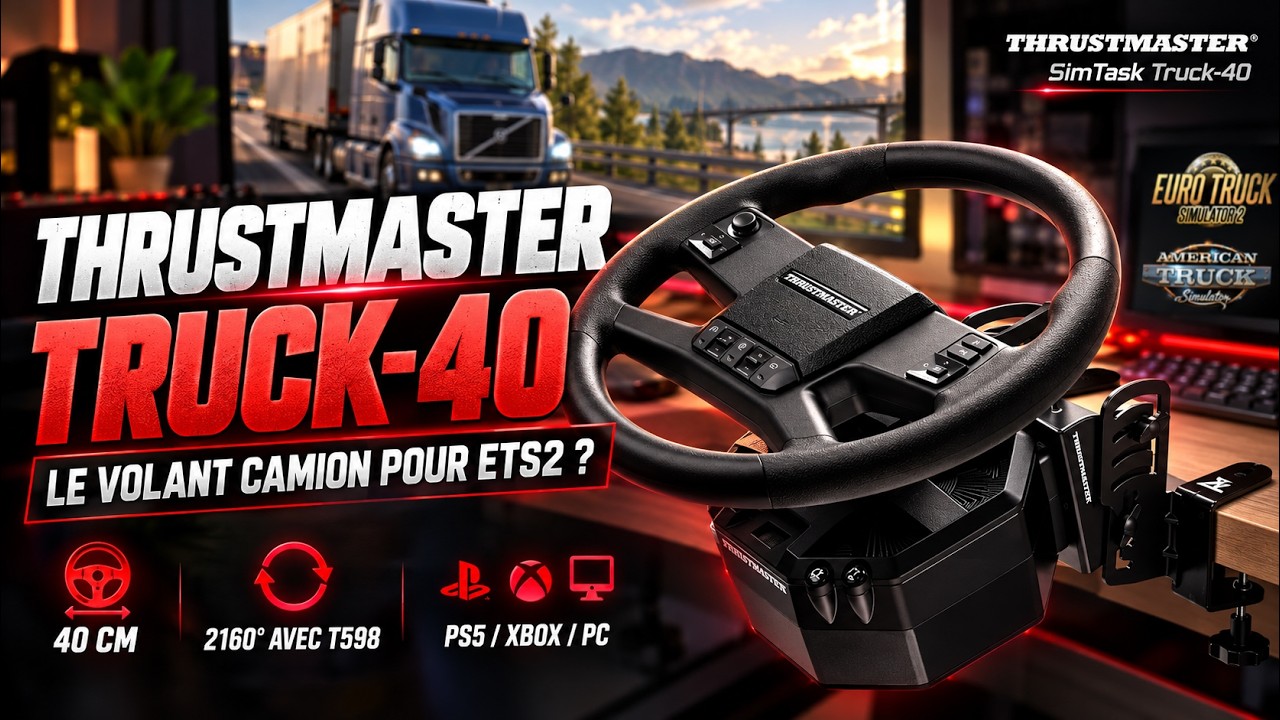
A 40cm steering wheel, but above all a real truck stand
The size of the steering wheel immediately catches the eye. With its 400 mm diameter , the SimTask Truck-40 adopts proportions much closer to a heavy-duty truck steering wheel than the 28 to 32 cm wheels usually used in sim racing. But reducing this product to its steering wheel alone would be a mistake.
The Truck-40 comes with a stand that allows the base to be positioned almost horizontally. It is this change in geometry that truly transforms the riding position.

Thrustmaster uses an all-metal structure made of 4mm thick sheet metal , with four height positions , an adjustable tilt of up to 30° and adjustments that can be made without tools.
During our first hands-on experience at Gamescom, this was already the element that impressed us the most: we are no longer simply installing a large steering wheel on a simracing base, the whole thing really seeks to reproduce the position encountered in a truck.
22 controls directly accessible on the steering wheel
The SimTask Truck-40 has 22 action buttons . These include a mini-stick, two toggle switches, a mini-switch located at the rear of the steering wheel, and a central button dedicated to the horn.

This is a particularly interesting point about this type of device. SCS Software simulations require a huge number of commands, and having to constantly return to the keyboard quickly breaks immersion.
The layout remains relatively simple, but the main functions are accessible directly from the steering wheel.
A simpler finish than on the MOZA TSW
The obvious competitor to the Truck-40 is the MOZA TSW Truck Wheel , which we already highly praised in our review of the MOZA TSW truck steering wheel . Both offer a 40 cm diameter, but their design philosophy is quite different.
In direct comparison, the MOZA TSW clearly gives a more premium impression. Its construction and finish are more high-end, whereas the Thrustmaster wheel feels more like a utilitarian product with a greater presence of plastic.
But comparing only the two wheels would be quite unfair. At Thrustmaster, the €249,99 price tag quoted during our test also included the entire metal support that allows for this driving position specific to heavy-duty vehicles . Therefore, it's the complete package that needs to be judged, and not simply the perceived quality of the wheel.
Test with the Thrustmaster T598 Direct Drive
For our test, Thrustmaster recommended pairing the Truck-40 with a T598 , a setup we hadn't actually used in testing before. The T598 uses Thrustmaster's Direct Axial Drive axial flux motor. The manufacturer advertises 5 Nm of constant torque , with an overshoot capability of up to +100% during certain one-off effects.
A direct comparison with a MOZA R5 therefore requires some caution: the latter is advertised at 5,5 Nm of peak torque , which doesn't correspond exactly to the same measurement method. Both, however, operate in a relatively similar category of affordable Direct Drive base models.
During our test, the T598 Servo Base was priced at €399,99 , while the complete package including the base, a 30cm Sportcar wheel, and Raceline pedals was listed at €499,99 . We also presented the Thrustmaster T598 and its axial flux Direct Drive technology in more detail.
Up to 2160° on PC: a feature already present during our test
The T598 is configured using the My Thrustmaster Panel application , available for Windows. For our test, we used version 1.3.244.0 of the application with a T598 equipped with firmware 3.22 . The software allows you to modify the overall force feedback power, friction, inertia, damping, end stops, and rotation angle.

During our PC test, the Truck mode already allowed us to achieve 2160° of rotation with firmware 3.22. It would therefore be misleading to present this range as a new feature introduced only with My Thrustmaster Panel 2.0. On ETS2, this range obviously becomes very useful during maneuvers and sharp turns. However, this 2160° should not be considered a decisive advantage over MOZA. Competing solutions can also handle very large rotation angles.
The appeal of the Truck-40 lies more in the combination of the steering wheel, its support and the Thrustmaster ecosystem.
My Thrustmaster Panel 2.0 and firmware 3.25: what's new
My Thrustmaster Panel 2.0 features a redesigned interface and navigation, a revamped update process, and support for the SimTask Truck-40 . The official release notes reserve the Truck, Engine Roar, and 2160° settings for the T598-P (PlayStation/PC).
Firmware 3.25 officially adds support for the Truck-40 and 2160° on PC only . It also allows the base screen to be rotated 180° on PC and PlayStation . Engine Roar was already mentioned in the patch notes for firmware 3.08.
The product page already includes My Thrustmaster Panel 2.0.1.0 : this patch resolves an incorrect driver version display issue that could trigger unnecessary update loops. To install firmware 3.25, the manufacturer recommends using the application and following its instructions.
These announcements do not allow us to generalize the truck settings to the T598-X . For our test, the key question remains whether the software updates simplify daily configuration. This will need to be verified in a new test, particularly regarding the assignment of controls in ETS2.
Installation in ETS2: limitations encountered during our initial test
This is probably the main snag we encountered during our installation. Thrustmaster officially states that the Truck-40's controls are automatically assigned in Euro Truck Simulator 2 and American Truck Simulator . This isn't exactly what we found during our testing.
On first launch, ETS2 didn't correctly recognize the hardware. Our machine had previously hosted a MOZA setup, which suggested a potential conflict with an older configuration. Ultimately, a complete PC restart was enough for the T598 and Truck-40 to be correctly detected.
However, the commands were not pre-configured as we might have expected. Therefore, we had to perform some of the mapping ourselves in ETS2.
For someone familiar with steering wheels and Euro Truck Simulator 2, the process isn't really complicated. But when a peripheral is advertised as Plug & Play, the experience should logically be more seamless.
The official inclusion of Truck-40 support in the new software versions is not enough to confirm that automatic assignment now works in our configuration. Therefore, we are keeping this observation as feedback from our initial test, to be reassessed with the updated versions.
A driving position that truly changes ETS2
Once installed and configured, it is ultimately the driving position that best justifies the concept of the Truck-40. With its 40 cm diameter and the base almost lying flat on the desk, the hand position has little to do with that of a traditional simracing wheel.
In long curves and especially during maneuvers, the large diameter provides a much more suitable feel for driving a heavy goods vehicle.

The stalk switch also contributes to the immersive experience. Being able to activate the turn signals directly behind the steering wheel seems almost trivial, but quickly saves you from having to reach for a button on the keypad. The question was also whether the T598's 5 Nm of torque would remain sufficiently convincing with a 40 cm steering wheel , whose diameter inevitably creates more leverage.

In ETS2, where the objective is obviously not to fight with extremely powerful force feedback like in some automotive simulations, the torque of the T598 remains consistent with the use of the Truck-40.
€250, €650 or €750: how much does the setup really cost?
Based on the prices observed during our test, the Truck-40 alone was offered at €249,99 . For a gamer already owning a compatible Thrustmaster base, the pricing is quite attractive: simply adding the kit significantly transforms their setup. Starting from scratch, the calculation is different.
With these prices, a T598 Servo Base at €399,99 combined with the Truck-40 brings the total cost of the base, wheel, and stand to around €650 . But at that price, it's still missing a pedal set. The complete T598 package at €499,99 , to which you add the Truck-40, comes to around €750.
You also have the 30cm Sportcar steering wheel and Raceline pedals, which makes it very easy to transform your truck setup into a car-specific installation.
The competition is fierce against the MOZA R5 Trucking Bundle.
MOZA, for its part, has a particularly aggressive offer with the R5 Trucking Bundle . This pack includes a 5,5 Nm R5 Direct Drive base, a 400 mm TSW wheel , an SR-P Lite pedal set, and a Truck Mount. In our initial comparison, its list price was around €599 , with promotions likely to further reduce the price. It's therefore essential to check current offers before choosing between the two bundles.
For a PC-only gamer looking solely for a setup for ETS2 or ATS, this offer is particularly hard to ignore. The TSW wheel also boasts a finish that appears more premium than that of the Truck-40.
Thrustmaster, however, has one very important card that the R5 does not have: console compatibility.
PS5 and Xbox compatibility could become its best selling point.
The SimTask Truck-40 is part of the Thrustmaster ecosystem of platforms on PC, PS5, PS4, Xbox Series X|S, and Xbox One , depending on the platform used. The T598, for example, is available in both the PlayStation and Xbox ecosystems. However, it's important to distinguish between hardware compatibility and software settings: the capabilities described for one version should not be automatically applied to another.
This argument becomes particularly interesting with the upcoming release of Euro Truck Simulator 2 and American Truck Simulator on consoles.
The console version of ETS2 is becoming more and more concrete: Euro Truck Simulator 2 was already running in a playable version on PS5 at the Tokyo Game Show 2026.
For a player wishing to use their PC setup but also enjoy ETS2 or ATS on PlayStation or Xbox in the future, Thrustmaster therefore has a particularly interesting advantage over a MOZA R5 currently designed for PC.
Our review of the Thrustmaster SimTask Truck-40
The Thrustmaster SimTask Truck-40 is not the most luxurious truck steering wheel on the market.
Compared to the MOZA TSW, its finish appears simpler and there's more plastic. Our initial installation in ETS2 also required more intervention than the Plug & Play promise suggested. The updates to My Thrustmaster Panel and the firmware are therefore worth monitoring, but we can't yet conclude that the difficulties encountered during our test have been resolved.
But Thrustmaster doesn't just sell a steering wheel.
The included metal stand, the much more realistic driving position, the 40 cm diameter , and the controls specifically designed for the truck make for a cohesive package at the price of €249,99 noted during testing . On PC, the 2160° field of view we had already used contributes to comfort during maneuvers.
For someone already equipped within the Thrustmaster ecosystem, the product is particularly easy to consider.
And with Euro Truck Simulator 2 and American Truck Simulator getting closer to consoles, PlayStation and Xbox compatibility could ultimately become its most important argument against MOZA's solutions.
The Thrustmaster SimTask Truck-40 in brief
👍We love it
- The actual diameter is 40 cm
- The driving position is significantly closer to that of a truck
- The excellent metal stand that came with the steering wheel
- The stalk and controls are directly accessible
- The T598 Truck mode used during our PC test
- Up to 2160° rotation on PC, already accessible during our test
- Compatibility with the Thrustmaster ecosystem
- The opening to PS5 and Xbox
- The price of €249,99 for the steering wheel and stand set during testing
👎We like it less
- A less premium finish than the MOZA TSW
- A complete setup is more expensive when starting from scratch
- The Plug & Play functionality with ETS2 did not work as advertised during our test.


