

The BeamNG.drive 0.40.4 update , released on October 29, 2026 , fixes several annoying bugs on PC and PlayStation 5 : force feedback steering wheels spinning on their own, crashes, freezes in Career mode, and display issues in virtual reality. It also adds an official configuration for the Thrustmaster T150 on both platforms.
These fixes extend the release of BeamNG.drive 0.40 on October 19th, which introduced local split-screen multiplayer, NVIDIA DLSS, AMD FSR 3 and 4, the Cherrier Percheron truck, and physics-based occupants. We detail the fixes in versions 0.40.4, 0.40.3, 0.40.2, and 0.40.1 below , before reviewing all the major new features of 0.40.
BeamNG.drive 0.40.4: fixes from October 29, 2026
One week after the October 22nd hotfixes, BeamNG is rolling out a new series of fixes on PC and PS5. The official patch notes for version 0.40.4 cover force feedback, stability, VR, saves, and several gameplay elements. Here's what's changing for players.
Steering wheels: the spontaneous turning problem fixed, the Thrustmaster T150 added
The studio has announced a fix for the wobble detection system , which could, under certain circumstances, cause the steering wheel to spontaneously turn to the right . A first fix for a similar issue was already introduced in version 0.40.2; version 0.40.4 specifically addresses this wobble detection. These are therefore two successive fixes, not a new game feature.
Another important new feature: the Thrustmaster T150 now has an official default control configuration, both on PC and PS5 . If you have already manually configured your wheel, your personal assignments are retained alongside those added by the studio. To revert entirely to the official settings, BeamNG indicates the path Options > Controls > Reset to default bindings . Warning: this command also resets your customizations. Alternatively, you can manually delete any new default assignments that you don't like.
Thrustmaster: Why does the force feedback decrease by 25%?
BeamNG.drive 0.40.4 reduces the default force feedback strength of Thrustmaster racing wheels by 25%. This is not a hardware power loss : players can still increase or decrease the intensity from Options > Controls > FFB , by selecting the steering assignment and then the Strength slider . The change affects the setting offered by the game, not the maximum torque of your wheel base.
The update also fixes issues with modifier key assignments on PS5 steering wheels, as well as a case where the clutch would disengage on its own during vehicle recovery despite the pedal still being pressed. To check compatibility for different models, see our guide to steering wheels compatible with BeamNG.drive on PS5.
PS5: Fixed a GPU crash and loading freezes
On PlayStation 5 , version 0.40.4 fixes a GPU-related crash and a freeze that could occur when loading a mission if the console's memory was full. The studio is also improving its diagnostic tools for insufficient memory issues to better identify certain other crashes: this part of the changelog does not mean that all memory-related crashes have been eliminated.
The patch also fixes an issue with the X button when used with both a steering wheel and a DualSense controller. Screenshot oversampling is also disabled on PS5. In drag racing, some help icons that were not displaying correctly on consoles have been restored.
PC and Career mode: crash and save game fixes
On PC, BeamNG has announced fixes for rare startup crashes that occurred during exceptionally long loading times, for example, with an SSD exhibiting abnormally slow read or write speeds. The developers have also enhanced the diagnostic logs to facilitate the analysis of certain crashes.
Career mode benefits from two changes: a fix for a game freeze during the installation of certain parts, and a potential fix for defective part states that could prevent a save file from loading. The studio therefore does not guarantee that all previously unloadable saves will be recoverable.
The interface has also been optimized: image loading, paint preview, and quick actions in the menus. The game also fixes options that weren't saving correctly, as well as bugs in the mission configuration menus.
VR on PC: ghosting, brightness, lighting, and video memory
PC players using a VR headset are getting several fixes at once. The changelog mentions ghosting , washed-out images, missing lights, excessive brightness when switching to VR, ignored upscaling settings, and a crash.
BeamNG also enables a sharper rendering layer for the interface by default when the hardware allows it. With the old interface rendering mode, without a dedicated layer, VRAM consumption is reduced by approximately 100 MB . These changes apply to the PC version ; this is not an announcement of VR compatibility for PS5.
Split screen, mods and replays: several additional adjustments
The patch improves vehicle reset in split-screen modes and allows each player to choose a face for their character. Some ghost objects that could damage cars after activities have been removed. In the PC mod manager, an issue that sometimes prevented a mod's detailed information page from opening has been fixed.
BeamNG also addresses a memory leak during repeated movement within a replay, the rendering of tire noises in newly recorded replays , and vehicle occupants. The relocation of certain occupant system definitions aims specifically to reduce incompatibilities with older mods.
BeamNG.drive 0.40.3: the October 22nd backup fix
An intermediate version was also released on October 22, 2026 , following version 0.40.2. The official changelog for BeamNG.drive 0.40.3 announces the correction of a bug that could prevent Career mode from saving new progress . Two other changes address a memory leak in the View interface subsystems and the oversampling and upscaling information in Photo mode.
Not to be confused with patch 0.40.4: version 0.40.3 deals with a blockage of progress saving , while 0.40.4 specifically targets certain cases of impossible loading of a save file.
BeamNG.drive 0.40.2: previous fixes from October 22
Following an initial patch focused primarily on modded maps and split-screen, BeamNG.drive 0.40.2 addressed several issues that could disrupt driving or cause the game to freeze. The official patch notes for version 0.40.2 detail the changes specific to PC and PS5.
Steering wheel turning on its own, pedals reversed: the first fixes in version 0.40.2
This version already fixed a problem that could cause a steering wheel to turn to the right on its own and remain locked in that position . Version 0.40.4 completes this work with a fix for the oscillation detection system. Starting with version 0.40.2, the force feedback setting for unrecognized steering wheels had also been improved for safer operation with direct-drive bases.
On PC , several Thrustmaster steering wheels receive pedal assignments that were previously missing. The other changes below are explicitly listed for PlayStation 5 in the developer notes.
- Logitech RS50 and Logitech PRO on PS5: Added support for the handbrake.
- Thrustmaster steering wheels on PS5: The force feedback power adjustment range increases by 33%. This is a software setting change within the game, not a 33% increase in the physical torque of the base.
- Thrustmaster T598 on PS5: The issue of the accelerator and clutch being reversed has been corrected. If you had previously manually swapped their functions to work around the problem, you can now restore them to the correct order.
To adjust force feedback, the developer recommends going to Options > Controls > FFB : select the steering assignment, then adjust the Strength slider . You can also find our guide to BeamNG.drive compatible steering wheels on PS5 for supported models.
Audio crashes, memory leaks, and invisible active mods
Version 0.40.2 fixes a common crash related to the audio mixer freezing , which could leave the game unresponsive. Several memory leaks in the interface have also been fixed.
On PC, the mod manager is more resistant to corrupted files . This change resolves some cases where mods that were actually active no longer appeared in the list. However, it does not guarantee compatibility of all community creations with version 0.40.
A warning now appears when the game cannot access the user folder, for example, due to insufficient permissions or restrictions imposed by antivirus software. This access issue may prevent settings and mod states from being saved between sessions.
Less RAM used by GPS and four automatic career saves
The studio announces a saving of approximately 200 MB of RAM per navigation screen on vehicles equipped with a multimedia screen or added GPS. This figure refers to the RAM used by these screens, not a guaranteed increase in frames per second. On PC, fixes also affect Vulkan rendering, while the ergonomics of the upscaling settings are improved.
In Career mode , the number of autosaves retained in turn has been increased from two to four . The patch also addresses traffic, certain vehicles, and several activities. These initial fixes do not replace the new features of version 0.40 detailed below; they resolve some issues that arose at launch.
BeamNG.drive 0.40 accompanies the launch on PS5
After more than ten years of development on PC, BeamNG.drive made its debut on PlayStation 5 on October 19, 2026. The studio is taking advantage of this launch to offer a major evolution of its racing simulator on all relevant platforms.
We previously detailed the release of BeamNG.drive on PS5 and the initial information regarding version 0.40 . This time, the developers are getting down to business with a long list of concrete new features, detailed in their official blog dedicated to update 0.40.
Here is the official trailer accompanying this console release.

Split-screen is here: up to 64 players on the same PC!
This is probably the most spectacular new feature of version 0.40. BeamNG.drive now offers true local split-screen multiplayer , allowing several people to drive simultaneously in the same environment.
On PS5, the number of players is limited to four. On PC, the engine theoretically allows up to 64 players locally ! However, be aware that this is a technical limitation announced by the studio, not a performance guarantee. Running that many vehicles, with that many simultaneous views, would require a particularly powerful computer configuration, not to mention the number of peripherals needed.
The mode can be launched from the main menu or directly during a game by selecting the Split-Screen option. Each player has their own vehicle, driving settings, and controls. On PC, it's also possible to assign multiple peripherals to the same player, for example, a steering wheel and pedals, while another player uses a controller.
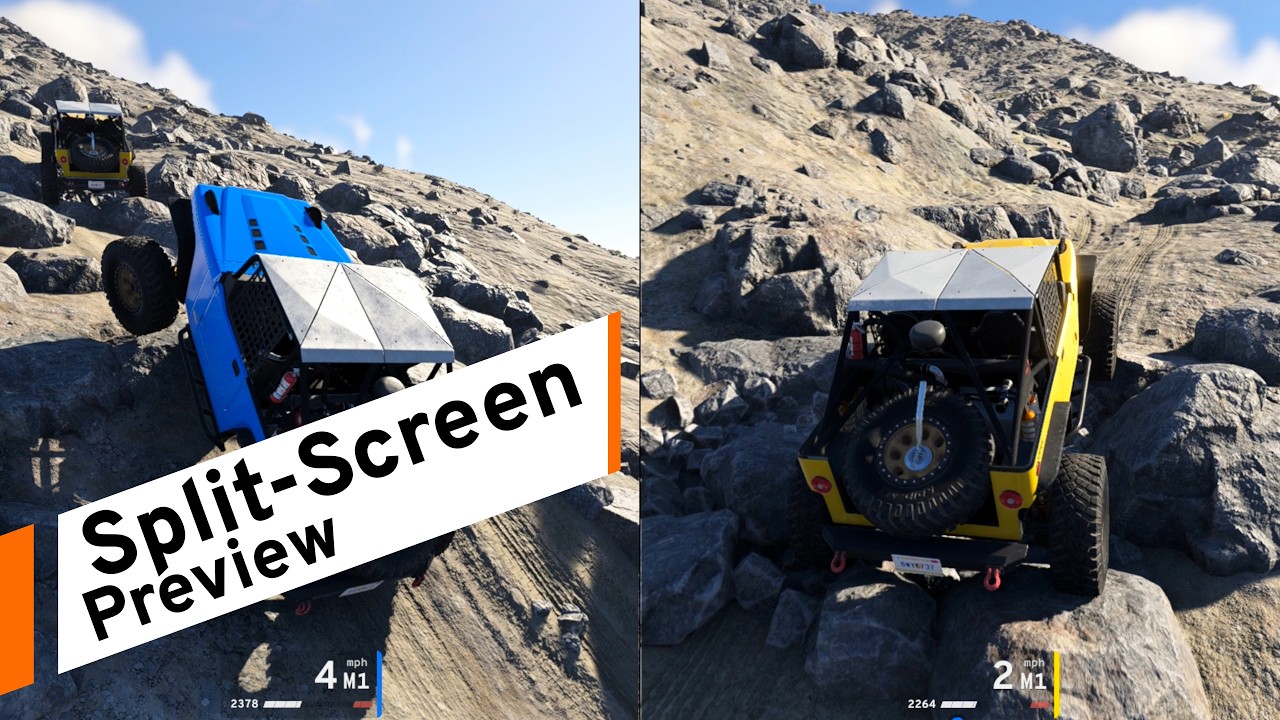
The studio didn't just add split-screen. Seven game modes are offered: classic races, drag races, police chases, destruction derbies, drift competitions, off-road driving, and even motorsport. Players can also enjoy free roam mode to explore the maps together, organize their own challenges, or cause spectacular crashes.
It's important to clarify that this is local multiplayer , not the announcement of an official online multiplayer mode. This is still a significant step forward for a simulator historically focused on the individual experience.
Bob arrives: characters now subject to physics!
Another particularly fun new feature: BeamNG.drive introduces real, physical characters inside its vehicles. And the studio has even given its new mannequin a nickname: Bob!
Until now, vehicles did not incorporate such a developed occupant system. Now, characters can sit behind the wheel or in the passenger seats, change places, and react to the vehicle's movements.
Each occupant adds 89 kg to the vehicle's mass , with a physical structure based on the renowned JBeam system. In other words, the passengers actually influence the mass distribution and react to acceleration, cornering, and jolts.
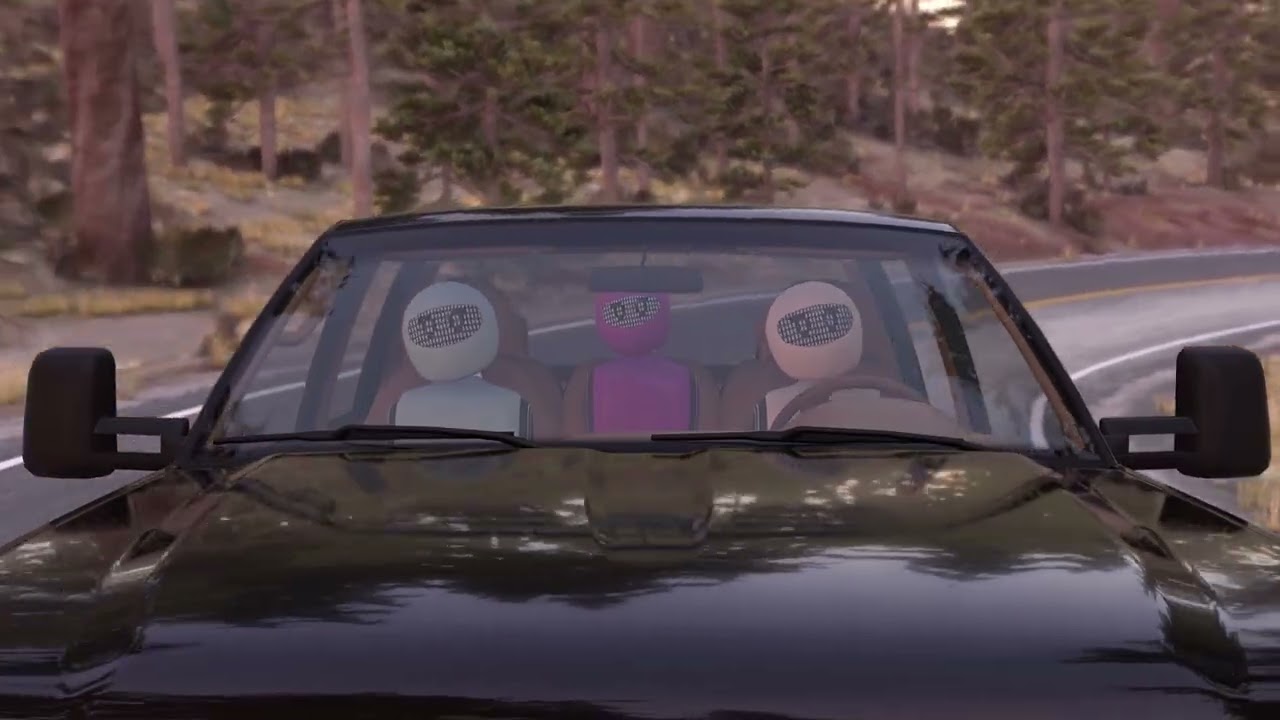
The on-foot mode also benefits from a new character model, now visible in the rearview mirrors. It's now possible to ride as a passenger in a friend's vehicle in split-screen mode and interact with certain interior features.
Beyond Bob's undeniably comical nature, this evolution strengthens the physics simulation aspect of BeamNG.drive. The occupants are no longer mere decorative elements: they are now an integral part of the vehicle's dynamic behavior.
Cherrier Percheron: a huge, fully interactive European truck
Heavy truck enthusiasts are about to get a new toy! Update 0.40 introduces the Cherrier Percheron , a European cab-over-engine truck inspired by early 2000s heavy trucks.
The fictional manufacturer Cherrier now offers a particularly modular vehicle, available with three cab sizes (S, L, and XL), five chassis lengths, and configurations ranging from two to five axles. In total, more than 50 chassis variants are announced, from the classic road tractor to imposing 8x8 off-road configurations.
Under the cab, you'll find a 12,8-liter turbocharged inline six-cylinder engine, producing between 310 and 500 horsepower depending on the configuration. Two transmissions are available: a 12-speed manual and a 7-speed automatic.
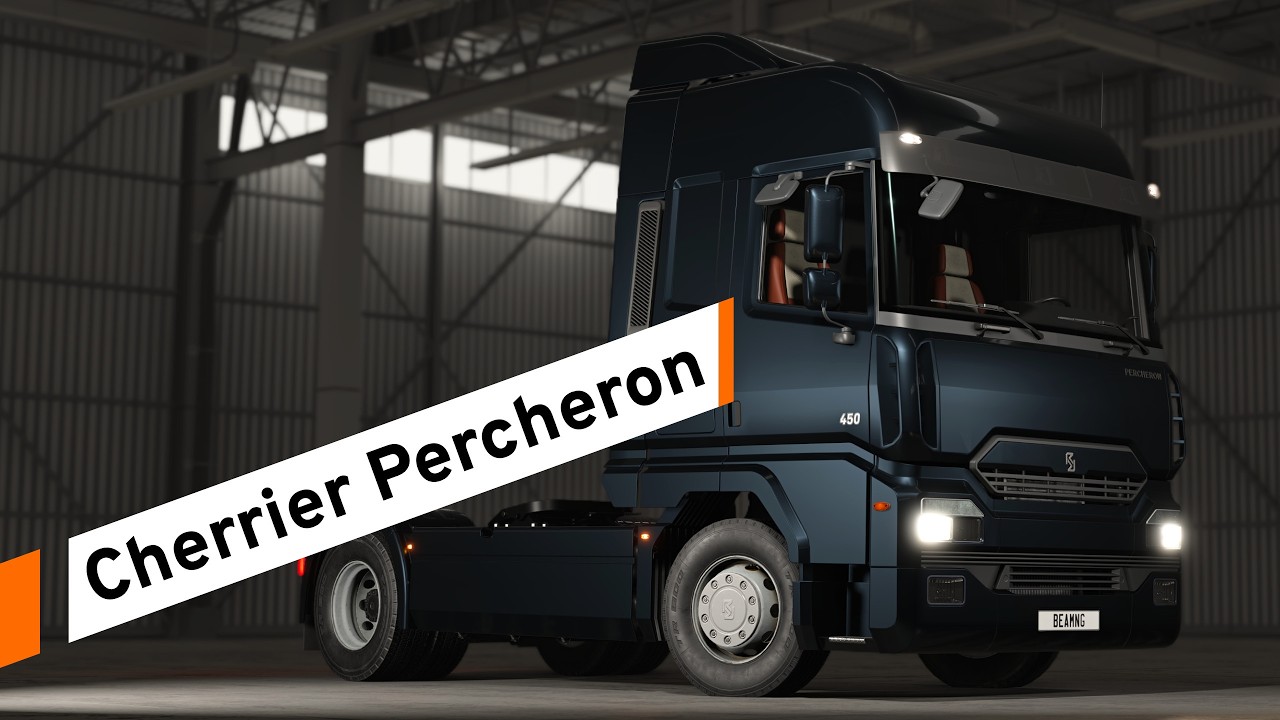
But what is most impressive is the level of interaction offered. Interior lighting, opening storage compartments, a functional sunroof, manipulable body panels, folding side skirts and an electro-hydraulic tilting cab: the Cherrier Percheron pushes the possibilities offered by the simulator even further.
The developers have also integrated a hydrodynamic retarder , capable of providing up to 600 kW of braking power at its maximum rated speed. Its operation takes into account, among other things, the temperature of the engine cooling circuit, which can increase under excessive use.
To complement this new truck, BeamNG offers a range of European FPU trailers, including flatbeds, insulated boxes, and tankers designed for transporting fuel or food products. This significantly expands road transport options and delivery capabilities.
NVIDIA DLSS, AMD FSR 4 and Intel XeSS: BeamNG modernizes its graphics
This is the other major announcement for PC gamers. BeamNG.drive 0.40 finally integrates several major modern anti-aliasing and upscaling technologies , with the arrival of NVIDIA DLSS, AMD FSR 3, AMD FSR 4 and Intel XeSS.
The engine also incorporates SMAA T2x, a temporal anti-aliasing technique, as well as a slider for adjusting the sharpness of upscaling technologies. Upscaling support is also extended to multi-monitor setups.
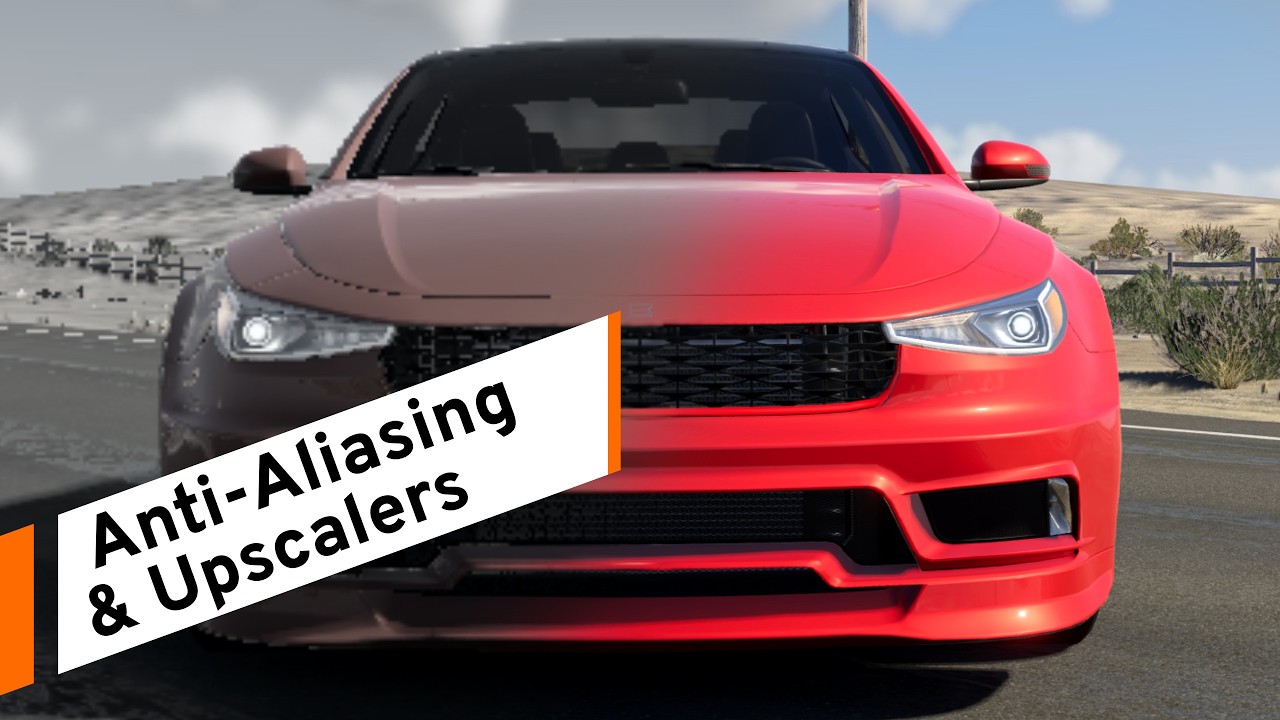
This development was particularly anticipated in a game whose physics simulation and graphics rendering can heavily tax the hardware. Upscaling allows an image to be calculated at a lower resolution before being reconstructed, with the aim of improving performance while preserving visual quality.
However, be aware that the announcement of DLSS support does not automatically mean that DLSS Frame Generation is available . The studio is confirming the upscaling technologies here, without explicitly announcing all the features associated with the different generations of these solutions.
The graphics settings have also been completely reorganized. They are now divided into more readable categories, including Image, Details, Brightness and HDR, Frame Rate and Sync, Multi-monitor, Lighting and Reflections.
More realistic reflections, improved shadows, and VR under DirectX 12
BeamNG.drive 0.40 is not limited to upscaling. The studio has also modernized several components of its rendering engine, notably with new stochastic reflections in screen space applied to vehicles, glass surfaces and water.
Ambient occlusion management has been improved, while a new Specular Occlusion technique makes areas where light reflections should naturally be attenuated more realistic. Light sources also benefit from softer shadows, taking their radius into account.
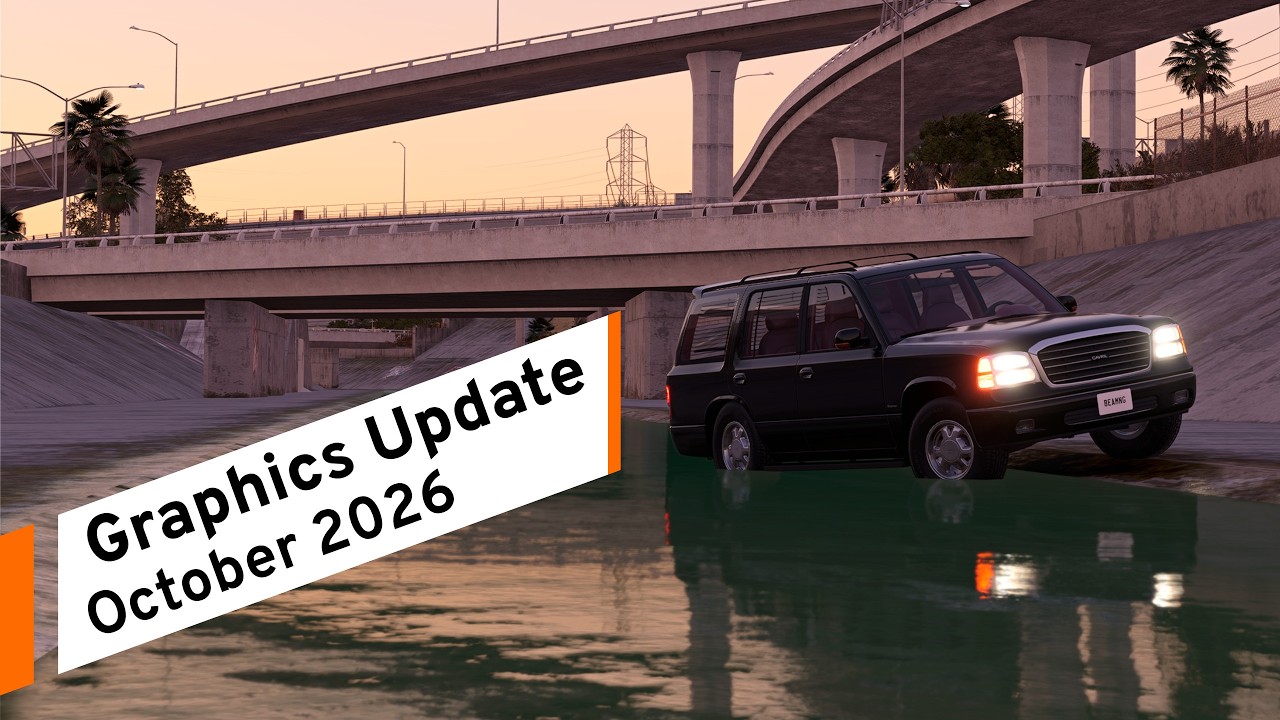
The developers also announced fixes for flickering, visual artifacts, and certain nighttime lighting issues. Vegetation rendering, dynamic reflection performance, and the stability of several graphical effects have also been improved.
On the virtual reality front, the news is encouraging. BeamNG.drive now supports VR under DirectX 12 via OpenXR on PC , with improvements in performance and visual quality. Head-swaying effects are automatically disabled when VR is active to enhance comfort.
An interesting development for fans of car simulation equipped with a VR headset, although the actual gains will obviously depend on the equipment used.
Impressive optimizations for mods, loading times, and replays
Beyond the visible new features, this 0.40 update brings significant optimization work. And some of the figures shared by the developers are particularly impressive.
In a test scenario comprising 500 maps, 3,000 spawn points, 3,000 different thumbnails, and 500 missions, the time required for certain mod mounting and unmounting operations was reportedly reduced from three minutes to just four seconds . This is a specific internal test, not a guaranteed improvement across all configurations, but the advertised improvement is dramatic.
The vehicle selector loading times have also been revised. In some cases tested by the studio, its opening time has been reduced from 10 to 15 seconds to just one or two seconds.
Performance during replay recording can also be up to three times faster, depending on the situation. The studio specifies that this optimization aims to correct a regression introduced in version 0.39.
The DirectX 12 engine benefits from improved synchronization, better GPU utilization, and a reduction in certain slowdowns. Vulkan and DirectX 12 rendering also adopt bindless rendering techniques designed to reduce CPU load in scenes with numerous objects and materials.
Other optimizations concern artificial traffic intelligence, collision management with vegetation, and various problems that could cause sudden drops in performance or crashes.
A new menu, reworked missions, and more comfort
The interface continues its transformation begun with previous versions. The main menu adopts a more modern presentation, with large tiles providing access to the main activities, including free driving, career mode, rally, and the new split screen.
A tutorial called First Drive also replaces the old free-driving tutorial. It is designed to make learning the simulator easier by progressively explaining vehicle acquisition, driver assistance features, customization, interactions, and the various activities available.
Italian delivery missions now utilize multiple configurations of the Percheron, while numerous objectives have been rebalanced. Rally mode also benefits from improvements to co-driver notes, visual cues, and timed starts.
Photo mode receives new environmental settings and a first version of its overlay editor on PC , allowing users to customize the elements displayed in screenshots. In free-roam and split-screen modes, a notification now appears when the frame rate drops below 25 FPS, warning the player that adding more vehicles may cause frame rate issues.
Windows on ARM and new possibilities for modders
Another technical development: BeamNG.drive now has a native version for Windows on ARM . Compatible computers can choose between the native ARM executable and the emulated x64 version. The developers are announcing potential performance gains, primarily in CPU-limited situations. However, some features remain absent from this native version, notably the Steam SDK and the Steam overlay.
Mod creators, meanwhile, have several new features to offer in editors, surface diagnostic tools, and vehicle systems. The terrain editor, World Editor rendering settings, and tools related to physical interactions have all received various improvements.
The studio also reports changes that may require adaptation of certain interface mods, including the removal of an old directive used in some HUD applications.
BeamNG.drive 0.40 on PC: an update that changes a lot of things
With version 0.40, BeamNG.drive continues to solidify its status as a remarkably comprehensive racing simulator. The addition of local multiplayer opens up new possibilities for playing with friends, the physical characters enhance immersion, and the Percheron horse significantly enriches transport activities.
On PC, the integration of DLSS, FSR technologies, and XeSS also represents a significant step in modernizing the graphics engine. Add to that the optimizations, VR improvements, and work on modding tools, and this update offers a particularly rich evolution.
Since the release of version 0.40 on October 19, 2026, for PC and PS5, BeamNG.drive has received four patches, culminating in version 0.40.4 on October 29. These changes notably improve the reliability of steering wheel controls, PC VR, and Career mode, though they do not guarantee the elimination of all bugs. For more details, consult the complete changelog for version 0.40 and the official patch notes for 0.40.4.
And on PlayStation 5?
This update also coincides with the launch of BeamNG.drive on Sony's console. For those interested in learning more about this new version, we've prepared several articles on Univers Simu.
You can consult our guide to BeamNG.drive's pricing, editions, and download options on PS5 , as well as our article on mods and their availability on consoles . Simulation enthusiasts with a steering wheel can also find our list of steering wheels compatible with BeamNG.drive on PlayStation 5.
October 20, 2026 patch: what BeamNG.drive 0.40.1 had already fixed
One day after the release of update 0.40, BeamNG.drive received its first patch. Released on October 20, 2026 , version 0.40.1 addressed several issues encountered by players on PC and PlayStation 5.
Among the announced changes, a fix addressed certain custom maps where vehicles could appear to be driving in the air.
BeamNG.drive 0.40.1: What bugs have been fixed?
The first changelog included the following fixes:
- Modded maps: Fixed an issue with invisible ground plane elevation on certain custom environments, which could give the impression that vehicles were driving in mid-air.
- Split screen: resolution of a blockage in the settings menu when a vehicle was using a custom configuration.
- Career mode: Fixed the tutorial windows that could get stuck on the screen.
- Horse-drawn carriages: improving their physical stability in order to reduce certain unstable vehicle behaviors.
- FPU Box Trailers: correction of the weight of certain loaded configurations, which were previously much too heavy compared to the advertised values.
- Vehicles: Correction of a problem with deformation of the front bumper bar of the Cherrier Vivace and Tograc during accidents.
- Artificial intelligence : resolution of a problem concerning certain signaling data used by AI-controlled vehicles.
- PS5: Fixed an interface crash that could occur when loading many images simultaneously.
These changes are detailed in the official BeamNG.drive 0.40.1 release notes . Version 0.40.2 continued this work, before the 0.40.3 and 0.40.4 patches detailed at the top of this article.
BeamNG.drive 0.40.4: Questions about bugs, steering wheels, and save games
Do mods work with BeamNG.drive 0.40.4?
The patches address several specific issues: version 0.40.1 corrected the ground plane elevation of certain modded maps; version 0.40.2 improved the mod manager's resistance to corrupted mods; and version 0.40.4 fixes the display of certain mod pages and reduces incompatibilities with older modded vehicles. This does not mean that all mods are compatible : some creations may still require an update from their creator.
BeamNG.drive has been crashing since version 0.40: what to do?
First, check that the latest available patch is installed. Version 0.40.2 fixed an audio mixer freeze and several memory leaks in the interface; version 0.40.4 addresses a GPU crash on PS5, a mission freeze when PS5 memory is full, and rare startup crashes on PC. However, these changes do not guarantee the elimination of all crashes.
On PC, test the game without your mods to determine if a community-created mod is causing the problem. Checking the game files can also be helpful. If you clear the cache, use the built-in tool in the launcher rather than manually deleting your files. Proceed step by step to identify the cause of the malfunction.
Why are my T598 pedals still reversed on PS5?
Version 0.40.2 fixes the reversed accelerator and clutch assignments on the Thrustmaster T598 for PS5. If you manually changed the assignments before the patch, please double-check them and restore the correct order after the update.
Is the Thrustmaster T150 now configured on BeamNG.drive PS5?
Yes. Since version 0.40.4, BeamNG provides an official default control configuration for the Thrustmaster T150 on PS5 and PC . Existing custom configurations remain; therefore, it is not necessary to delete your settings to benefit from the fix.
Why does the Thrustmaster force feedback seem weaker?
Patch 0.40.4 reduces the default force feedback strength on Thrustmaster wheels by 25%. The hardware does not lose torque: adjust the intensity in Options > Controls > FFB according to your setup and preferences.
Does update 0.40.4 add VR to BeamNG.drive on PS5?
No. The VR fixes in version 0.40.4 explicitly concern the PC version . They do not constitute an announcement of PlayStation VR2 compatibility on PS5.
What changes for career mode saves?
Version 0.40.2 increased the number of autosaves that rotate in Career mode from two to four, without doubling their frequency. Version 0.40.3 fixed an issue that sometimes prevented new progress from being saved. Finally, version 0.40.4 includes a potential fix for some saves that refused to load due to problems related to vehicle part condition.


